
Kai Bossen, field AE at Doctolib, doesn't use AI to avoid talking to customers. He uses it to make his conversations more relevant, thoughtful and personal. One of our favourite quote from our conversation with him is:
AI's biggest opportunity isn't to make sales easier. It's to make sales more human!
And in order to achieve this, he build his own little team of 6 AI agents that support him throughout the entire sales process and help him save 7–10 hours every. single. week.🤯
Let's walk through his setup, step by step.
The AI Sales Timeline: From Prospecting to Closing
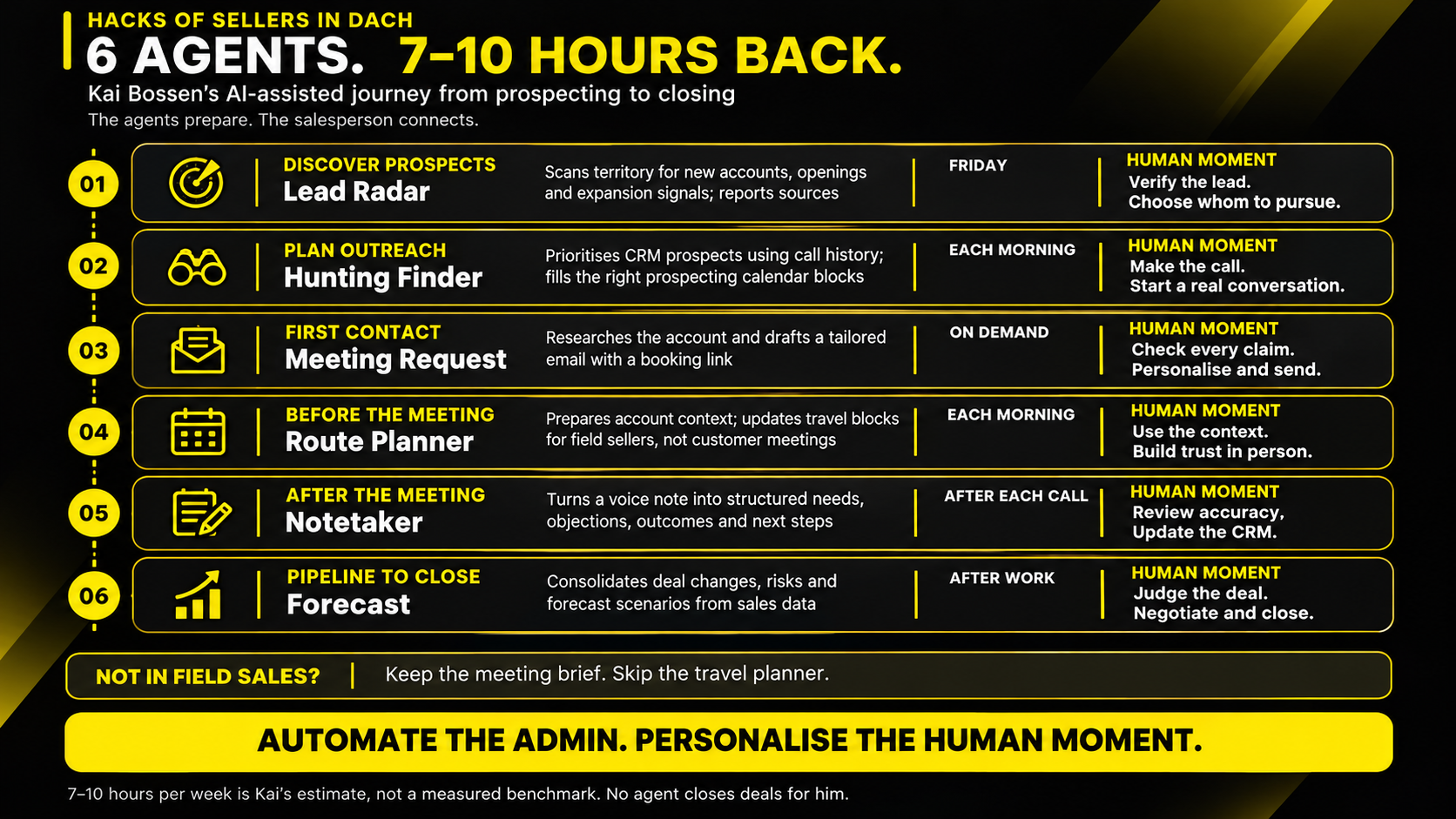
‼️ Disclaimer here: These aren't 6 agents every seller must build.
They're 6 examples of where AI can make a genuine difference, depending on your sales motion! So check it, keep what works and delete what doesn't 🤗
1. Prospecting: Let AI find the opportunities
Agent: Lead Radar | Trigger: Every Friday
-
What it does: Scans Kai's sales territory for new practices, takeovers and expansions. Every Friday, he receives an email with relevant prospects, sources and recommended next steps.
-
Build your own: Define your ICP, target market, buying signals (e.g. funding, hiring, expansions) and trusted research sources.
-
Watch out: Require source links, research dates and duplicate checks. Always verify leads before entering them into your CRM.
2. Outbound: Call the right prospect at the right time
Agent: Hunting Finder | Trigger: Every morning
-
What it does: Combines 12 months of historical call data, Google Popular Times (where available) and Salesforce history to identify promising calling times. Prioritised prospects appear directly in Kai's calendar hunting blocks.
-
Build your own: Analyse connection rates by industry, persona, weekday and time. Match them with CRM activity and available prospecting slots.
-
Watch out: AI predicts opportunities, not guaranteed answers. Measure meaningful conversations, not just call volume.
3. First Contact: Personalise without hours of research
Agent: Meeting Request | Trigger: When a prospect requests email contact
-
What it does: Researches the prospect's website, services and relevant developments, then creates a personalised email draft with a booking link directly in Gmail.
-
Build your own: Provide your ICP, value proposition, tone of voice, approved messaging and successful email examples.
-
Watch out: Never invent pain points or personalisation. AI drafts, you verify, personalise and send.
4. Meeting Preparation: Walk in knowing your customer
Agent: Route Planner | Trigger: Every morning
-
What it does: Prepares travel blocks, identifies potential prospect visits within a 5 km detour and adds account history directly to Kai's calendar.
-
Build your own: In field sales? Add route optimisation. Otherwise, build a pre-meeting briefing agent that summarises account history, stakeholders and next steps.
-
Watch out: Never let AI reschedule fixed customer meetings or overwrite important information. Prioritise relevant context over information overload.
5. After the Meeting: Remember what matters
Agent: Notetaker | Trigger: After each customer conversation
-
What it does: Converts Kai's quick voice notes into structured summaries covering customer needs, objections, outcomes and next steps, ready for review and transfer into Salesforce.
-
Build your own: Define your CRM fields and ask AI to extract key insights, action items, owners and deadlines.
-
Watch out: Separate facts from assumptions. AI must never invent commitments or fill gaps with guesses. Review before updating your CRM.
6. Forecasting & Closing: Know where you stand
Agent: Forecast | Trigger: Every evening
-
What it does: Consolidates Salesforce pipeline data and produces monthly optimistic, realistic and pessimistic forecasts based on closing probabilities.
-
Build your own: Define your deal stages, forecasting rules and data sources. Ask AI to highlight changes, missing information and potential risks.
-
Watch out: Bad CRM data creates bad forecasts. AI can support your decisions, but negotiations, relationships and closing remain your responsibility.
How to Build Your First AI Agent (Without Overcomplicating It)
Here's what I would take away from Kai's setup:
❌ Don't start by asking, "Which AI agent should I build?"
✅ Start by asking, "Which repetitive task is taking time away from my time with prospects?"
Every useful agent needs 6 things:
-
A purpose: What specific recurring problem does it solve?
-
A trigger: When should it run? every morning, every Friday or after a meeting?
-
Knowledge: Which CRM fields, documents, rules and reliable sources does it need?
-
An output: What exactly should it deliver, and where? An email draft, calendar description or structured CRM note?
-
Guardrails: What must it never invent, change, overwrite or send?
-
Human oversight: Which decisions require your approval?
You can start with this prompt structure:
Every [trigger], use [approved data sources] to complete [specific task]. Prioritise using [defined criteria]. Deliver [exact output] directly to [destination]. Include sources and flag missing or conflicting information. Never [prohibited action]. Require my review before [customer-facing or consequential action].
Start with one agent, test its results, improve the instructions and only then consider building the next one.
Because six poorly configured agents just make six new problems... 🫣
Get the AE Playbook for 2027!
... and join us for our upcoming live panel with Harry-Quentin Pfeifer and Svenja Hallmann , two top-performing Account Executives at Doctolib!

We're diving into what the AE role will really look like in 2027:
-
AI workflows that save time
-
smarter prioritisation to customer relationships
-
closing strategies
-
and the sales skills AI simply can't replace.
Expect real experiences, practical tips and plenty of ideas you can implement immediately!
The future of sales isn't about replacing humans with AI. It's about becoming a better seller with it!
👉 Join us live and bring your questions!
Excited to watch you excel!
Your Sales in DACH Team ✨



Antworten